
FAQ & troubleshooting
Quick answers to the most common questions about building storybooks in the Story Studio, how stories are made, what approvals mean, why the stand-in child looks the way it does, and how to fix pages that look off.
Quick answers to the questions teachers and directors ask most when they first open the studio. If you hit something that isn't here, the short version is: most waits are normal, most approvals are final, and every family swaps in their own child at the end.
Making a storybook
Who actually writes and illustrates the stories?
The studio does the heavy lifting, and you stay in charge of every decision. You describe what you want in a short chat, the studio drafts an outline and the page text for you, and the pages are illustrated in your chosen art style. Nothing is final until you review and approve it, you can edit the summary, the outline, every page's words, and request changes to any illustration. Think of yourself as the author and editor: you steer and sign off, the studio drafts and draws.
How long does my first storybook take?
Plan for one focused sitting, with a few short waits along the way. Drafting the outline takes about 30 seconds and the page text about a minute and a half. Each piece of Cast art, the character and scene reference art, takes about two to three minutes, and page illustrations run roughly 20 to 40 seconds each. None of it needs you to sit and watch: everything keeps running if you leave the tab. It's completely safe to start a book, step away, and come back later to pick up where you left off.
How many pages does a storybook have?
Every storybook is a cover plus ten illustrated story pages, and it prints as a square hardcover or softcover book. Before you publish, you'll review eleven illustrations in all, the cover and each of the ten story pages.
Can more than one person on my team help build our stories?
Yes. Anyone you invite can create, edit, and publish storybooks, and can invite other teammates. When you send an invite, the studio emails it to them automatically (with a copyable link as a backup). There are two roles: owner and editor. The only difference is that owners can top up your studio's story credits; editors can do everything else. One tip: have just one person work on any single storybook at a time. The studio auto-saves as you type, so two people editing the same draft at once can overwrite each other's changes.
Approvals and the review steps
Why can't I go back and edit a step I already approved?
Approving a step is deliberately final, it locks that piece of the plan and kicks off the next stage automatically. When you approve the Story world, the outline starts drafting. When you approve the Outline, the page text starts drafting. This keeps the story moving forward. The soft "looks good" checkmarks on each item are just your personal checklist and never lock anything, it's the Approve button at the bottom that commits. So take your time on each item, then approve once you're happy.
I approved the Story world and now I'm stuck on a "Pick your story's voice" step. Is something broken?
Nothing's broken, this step is expected and required. Right after you approve the Story world, a 🎙 Pick your story's voice panel appears. It shows you a few sample lines written in your story's tone; tap one or more that sound right and save. You have to finish this before the Outline review will open. If you approved the Story world and don't see the Outline yet, finish the voice pick first.
The stand-in child
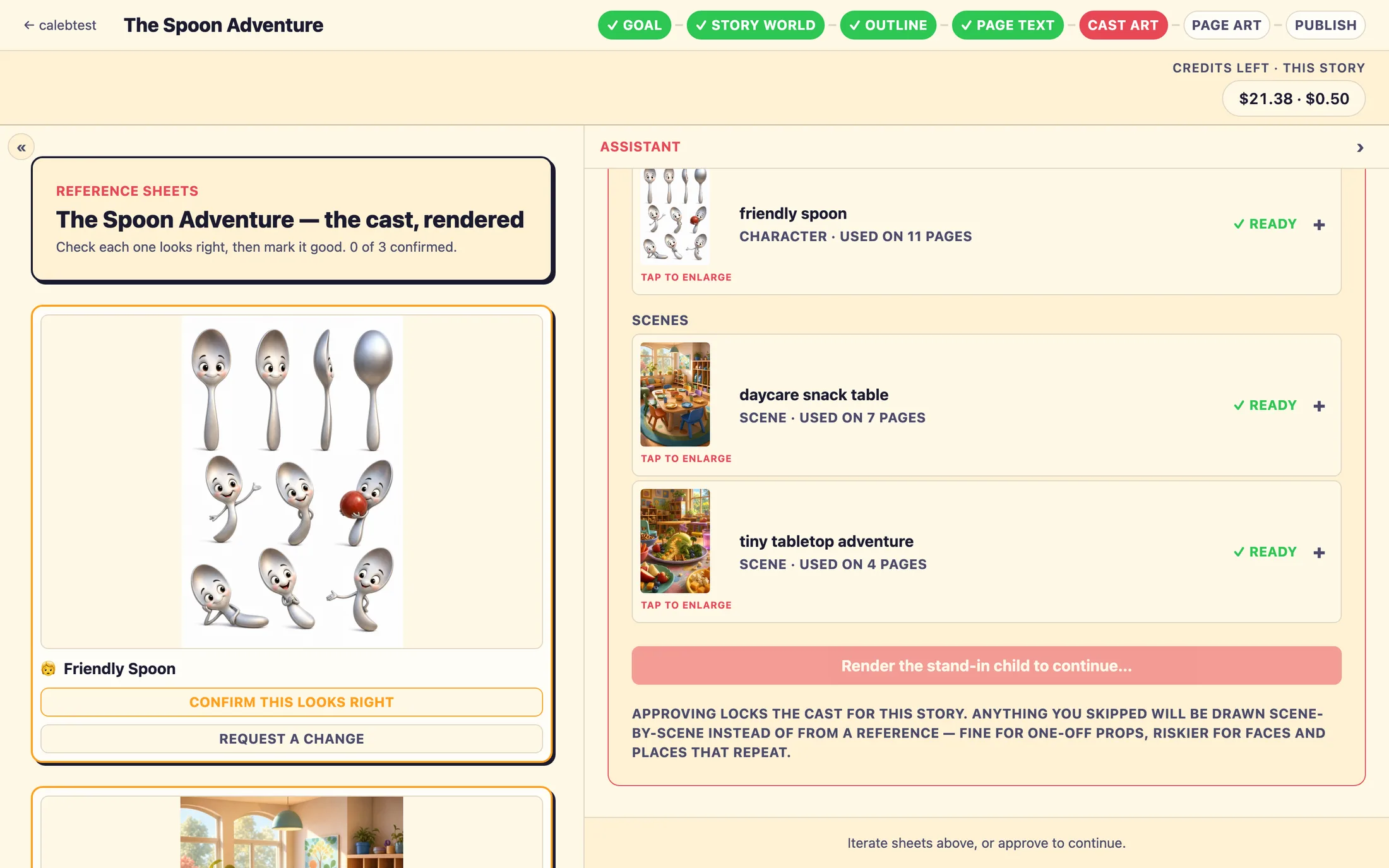
The stand-in child looks like a generic boy, but my story is about a girl. Did I do something wrong?
No, this is exactly how it's meant to look. The child in your storybook isn't a specific kid; it's a role that each family's own child steps into later. While you're building the book, all the art is drawn with a placeholder called the stand-in child, always a boy in a bright shirt color. That bright color is how the studio finds and swaps him out on every page when a real family creates their story, it's automatic, nothing for you to set up. On the Cast art step you're confirming the art style, the look and feel of the illustrations, not the child's face. Every family's own child replaces the stand-in in their copy.
Should I upload a photo of a real child while I'm building the storybook?
No. Reference photos in the studio are only for supporting characters, places, or things that recur in the story, a teacher, your classroom, a special keepsake. You never add a child's photo here. Each family adds their own child's photo later, when they make their version on your storefront.
What families get
What does a family actually see when they use one of my storybooks?
They visit your storefront at your org's web address, pick one of your published storybooks, enter their child's name and traits, and add a photo. The studio personalizes the book with their child, swapping in their name, pronouns, and likeness. After a short wait (about two to three minutes), they get a free preview of the first three pages: the cover plus two story pages. To unlock and read the whole book, they order the printed copy. You never touch a family's individual book, you only see counts and print orders roll in on your dashboard.
Why do families only see three pages for free?
That's by design, not a glitch. The free preview is always the cover plus the first two story pages. The rest of the book is illustrated only after a family orders it, so "unlocking" actually kicks off the full illustration of their personalized copy. If you're demoing to a parent, the three-page limit is expected.
Fixing things that look off
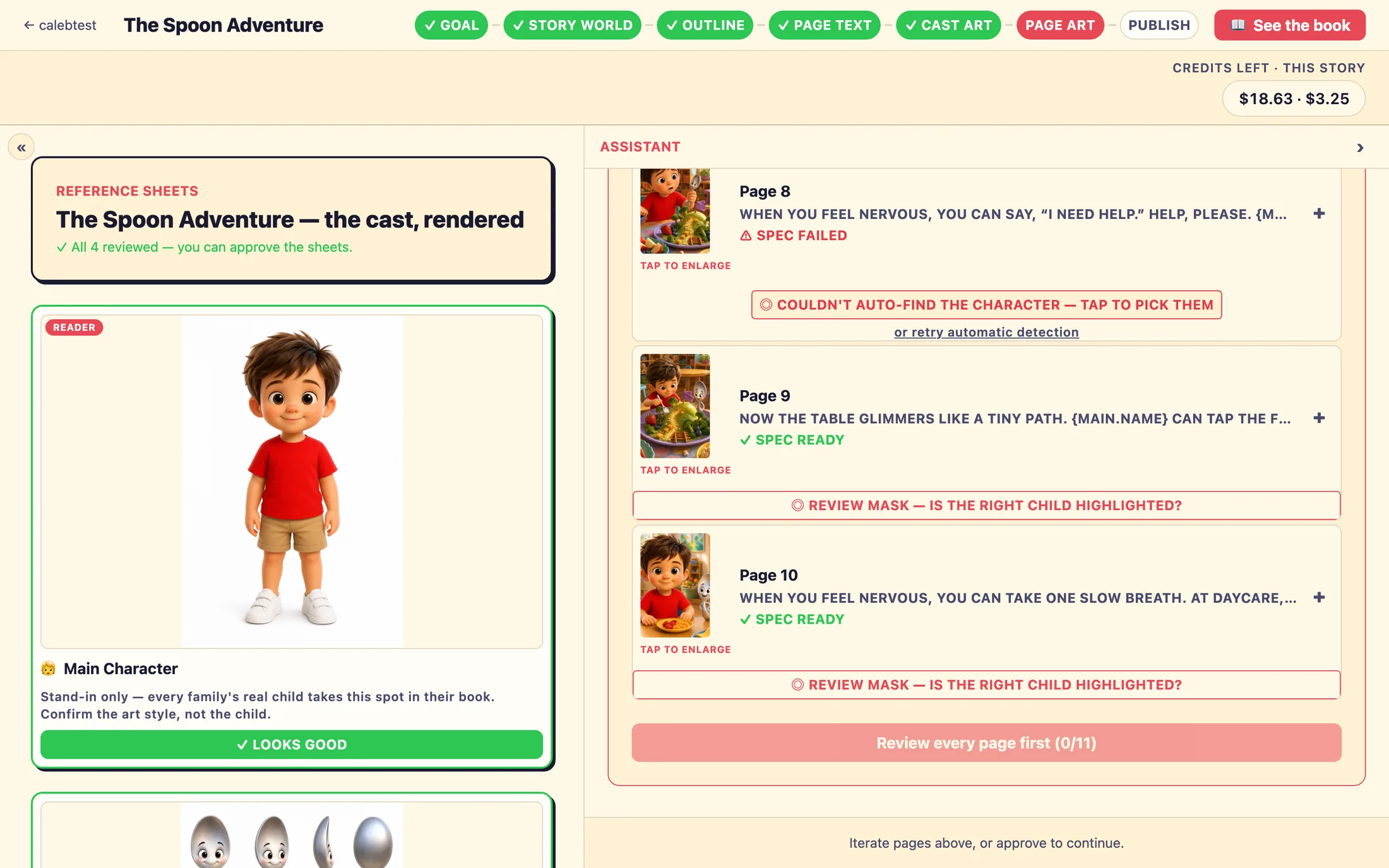
A page highlighted the wrong child, how do I fix it?
On each page you'll do a highlight check that spotlights the figure the studio has picked as the child (this is what each family's real child gets swapped in for). If it's the wrong figure, open the check, tap Wrong child, click to fix, and click the correct child in the picture. If the studio couldn't find the child at all, you'll see ◎ Couldn't auto-find the character, tap to pick them, same fix, just click the child once. Busy or crowded scenes are the usual reason it needs a hand. There's no auto-retry on purpose; one click is the reliable fix.
A page failed to render. What now?
You'll see a red block reading ⚠ This page failed to render: with the reason, and a Retry render button right on that page. Tap it to re-illustrate just that page. The approval button at the bottom of the step also names any failed page numbers, so you know exactly which to retry. One thing to know: while a page is re-rendering, the picture you see is the previous version until the new one lands, that's normal, not a failure. A fresh render can take one to three minutes.
Can I change a storybook after it's published?
Yes. Open the published storybook and choose ✏️ Edit book. Text changes go live right away for new family stories. Regenerated illustrations are held back until you confirm the new art's highlight, families keep getting the previous version until you check it, so nothing changes for them by accident. If you'd rather take a book down instead, pause it: that hides the book from families without touching any books they've already made.
Credits and quality
What happens if I run out of story credits mid-way through a book?
Story credits fund the drafting and illustrating your studio does. If you run out, actions that generate new art or text pause until you top up, your work is saved, nothing is lost. If you're an owner, you can top up yourself from the dashboard: tap Add →, then Add story credits, and pay any amount (it's added to your balance one-to-one). If you're an editor, you'll see the balance but not the top-up link, just ask an owner on your team to add credits.
Is anyone checking the books before they're printed?
Yes, every ordered book goes through review before it prints, and you don't have to run it. After a family orders, an automatic identity check makes sure the child looks consistent, and then the PrestoStories design team reviews the book before it's sent to the printer. You're not part of that approval loop; you'll just see the print order move through its statuses (like Under Review, then Printing, then Shipped) on your Print Orders page, with the customer's name, city, and tracking number.
Still stuck? Email support@prestostories.com and we'll help.